How Fiverr Works for Hiring Freelancers (Complete Beginner Guide)
In the fast-paced digital world of 2026, hiring skilled professionals no longer requires endless interviews, background checks, or long-term contracts. Enter Fiverr, the global marketplace that has transformed how businesses and individuals connect with talented freelancers for everything from graphic design and writing to web development and AI consulting. Whether you're a startup founder looking to build a website on a budget or a busy professional needing quick logo revisions, Fiverr offers a streamlined, transparent way to get high-quality work done—often within days.
If you're new to freelance platforms and wondering exactly how Fiverr works for hiring freelancers, you're in the right place. This complete beginner's guide breaks down the entire process step by step. We'll cover signing up, finding the perfect gig, placing orders, managing payments, handling revisions, and even advanced features like Fiverr Pro. By the end, you'll feel confident navigating the platform like a pro and avoiding common pitfalls that trip up first-timers.
Fiverr isn't just another job board—it's a gig-based ecosystem where freelancers create pre-packaged services called "Gigs." Buyers (that's you) browse these Gigs, compare options, and hire instantly. No bidding wars or endless proposals. It's efficient, secure, and built for speed. Ready to dive in? Let's explore how Fiverr works from the buyer's perspective.
What Is Fiverr and Why Should Beginners Choose It for Hiring?

Fiverr launched as a simple "everything starts at $5" marketplace but has evolved into a full-fledged freelance powerhouse. Today, it hosts millions of Gigs across 500+ categories, including programming, digital marketing, video editing, voiceovers, and emerging fields like AI prompt engineering or 3D modeling. Freelancers from around the world offer services, and buyers benefit from a massive talent pool without the hassle of traditional recruiting.
What sets Fiverr apart for beginners? First, its user-friendly interface makes hiring feel effortless. Unlike platforms where you post a job and wait for bids, Fiverr flips the script: freelancers showcase ready-to-buy services. You search, review, and order in minutes. Second, built-in protections like escrow payments mean your money stays safe until you approve the work. Third, transparent reviews, seller levels (from New to Top Rated and Pro), and detailed portfolios help you make informed decisions quickly.
For small businesses, solopreneurs, or anyone testing the waters of outsourcing, Fiverr lowers the barrier to entry. You can hire for one-off tasks or scale to ongoing projects. In 2026, with remote work normalized, Fiverr's global reach means access to specialized skills at competitive prices—often far more affordable than agencies. Plus, features like buyer requirements forms ensure clear communication from day one, reducing misunderstandings.
The platform's growth reflects its value: trusted by giants like Google, Netflix, and PayPal, yet accessible for everyday users. If you're hesitant about hiring online, Fiverr's low-risk model (start small with Basic packages) makes it ideal for beginners.
Signing Up on Fiverr: Your First Steps as a Buyer
Getting started couldn't be simpler—and it's completely free. Head to Fiverr.com and click "Join" in the top right. You'll sign up with your email, Google, or Apple account. The process takes under two minutes. Once registered, your account defaults to buyer mode, but you can switch to selling anytime.
Pro tip for beginners: Complete your buyer profile early. Add a professional photo, bio, and payment method (credit card, PayPal, or bank transfer options vary by region). This unlocks smoother ordering and helps Fiverr recommend relevant Gigs. Verify your email to avoid account limitations.
No credit card is required upfront for browsing, but you'll link one before placing your first order. Fiverr uses secure checkout with buyer protections, so your financial info stays safe. New users often start with a small $10–$50 Gig to test the waters—no commitment needed.
After signup, explore the homepage categories like "Graphics & Design," "Digital Marketing," or "Programming & Tech." Use the search bar for specific needs, such as "logo design for tech startup" or "SEO blog writing." Filters for delivery time, budget, seller level, and ratings refine results instantly.
Navigating the Fiverr Marketplace: How to Find the Right Freelancers
The heart of Fiverr is its searchable Gig marketplace. Type your service into the search bar, and thousands of results appear with eye-catching thumbnails, titles, and starting prices. But don't just pick the cheapest—smart searching saves time and money.
Use advanced filters: Sort by "Best Match," "Newest," or "Best Selling." Narrow by price range, delivery speed (same-day options exist), or seller location if relevant. Look for "Fiverr's Choice" badges or Level 2/Top Rated sellers for proven reliability.
Click a Gig to dive deeper. You'll see the freelancer's profile, portfolio samples, reviews, and response time (aim for under 1 hour). Read the Gig description carefully—it outlines exactly what you'll get. Many include video intros from the seller, adding a personal touch.
For beginners, start broad then refine. Searching "website design" might overwhelm; try "WordPress landing page design" for targeted results. Save favorite Gigs or freelancers for later comparison. Fiverr's algorithm learns from your activity, improving recommendations over time.
Understanding Gig Packages: Basic, Standard, and Premium Explained
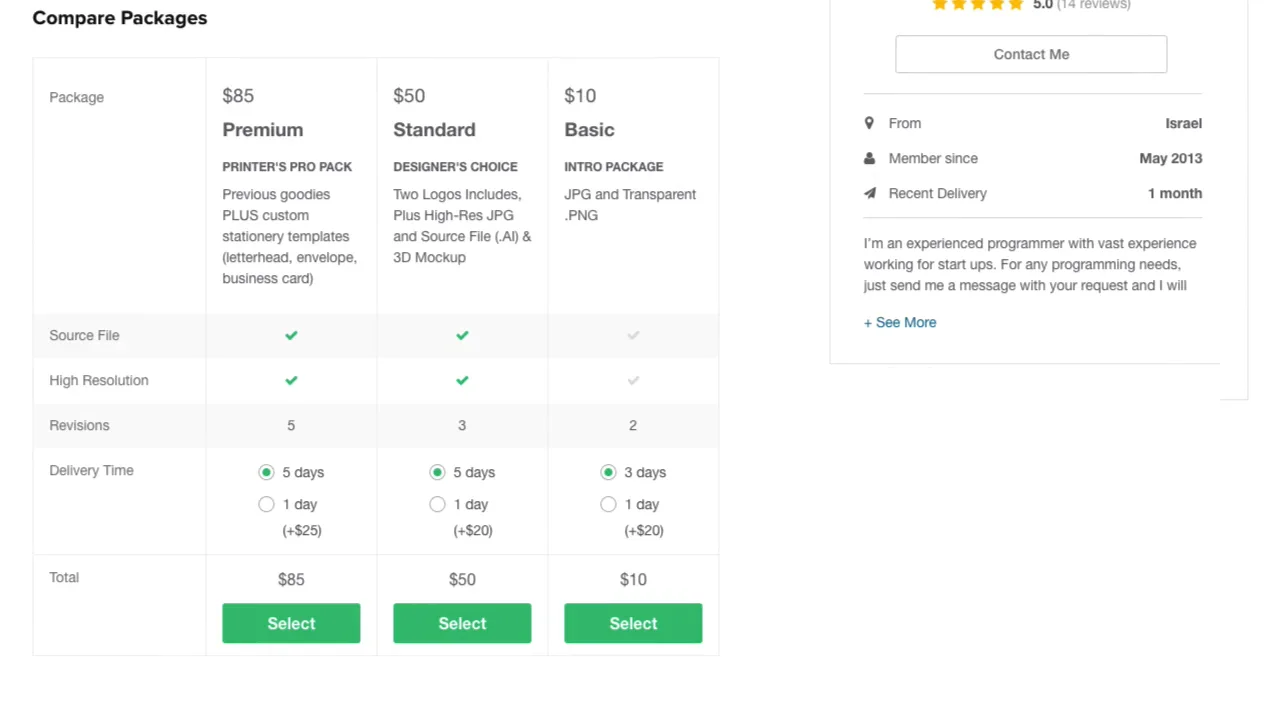
Every Gig on Fiverr comes in tiered packages—Basic, Standard, and Premium—designed to fit different budgets and needs. This structure is one of Fiverr's smartest features for beginners, letting you scale scope without guesswork.
- Basic: The entry-level option. Ideal for simple tasks like a quick logo sketch or 500-word article. Lower price, fewer revisions, basic deliverables.
- Standard: The sweet spot for most users. Adds more features, higher quality, and extra revisions. Think full branding kit or SEO-optimized blog post with images.
- Premium: For complex projects. Includes advanced extras like source files, unlimited revisions, or rush delivery. Perfect for professional-grade work.
Packages list what's included (e.g., file formats, revisions, delivery time) in a clear comparison table. You can also add "Extras" like faster turnaround or additional concepts for a custom boost.
Pricing starts low but varies—Basic might be $10–$50, while Premium reaches hundreds for specialized work. Always check what's included to avoid surprises. In 2026, many Gigs offer "Custom Offers" where you message the freelancer for a tailored quote.
Evaluating Freelancers: Key Tips to Hire with Confidence
Not all Gigs (or sellers) are equal. As a beginner, focus on these red-flag-free indicators:
- Reviews and Ratings: Aim for 4.8+ stars with 50+ reviews. Read recent ones for patterns—praise for communication or complaints about delays.
- Seller Level: New sellers are fine for low-stakes tasks, but Level 2 or Pro offer experience. Top Rated Pro freelancers undergo extra vetting.
- Portfolio and Samples: High-quality work samples show real capabilities. Video proofs or case studies build trust.
- Response Time and Order Completion Rate: Fast responders (under 24 hours) keep projects moving. High completion rates signal reliability.
- Buyer Requirements: Strong Gigs ask detailed questions upfront, showing professionalism.
Contact sellers before ordering. Send a polite message outlining your project: "Hi, I'm looking for a modern logo for my eco-friendly app. Can you share examples from your portfolio?" This gauges fit and clarifies expectations.
Avoid Gigs with generic descriptions or stock images. Trust your gut—professional thumbnails and clear English often indicate quality.
Step-by-Step: How to Place Your First Order on Fiverr
Once you've chosen a Gig:
- Select Package: Click "Continue" on your chosen tier.
- Customize: Add extras if needed.
- Confirm & Pay: Review total (including Fiverr's buyer fee—typically 5.5% plus any small order fee under $100). Secure checkout follows.
- Submit Requirements: Fill the buyer requirements form with details, files, and deadlines. This kicks off the order officially.
Funds go into escrow. The seller starts work, and you get updates via the order dashboard.
Communicating Effectively: Building Strong Freelancer Relationships
Clear communication is key to success. Use Fiverr's built-in messaging—keep it professional and specific. Share reference links, mood boards, or examples early.
Set realistic deadlines. Most Gigs include 1–3 revisions; use them wisely. If issues arise, address them promptly rather than waiting until delivery.
Many beginners overlook this: Respond quickly to seller questions. Delays can extend timelines.
The Payment Process, Fees, and Security on Fiverr
You pay upfront, but Fiverr holds funds securely until you approve delivery (or auto-release after 14 days if no action). This protects both sides.
Fees: Buyers pay a small service fee (around 5.5%) plus optional extras. No hidden costs for basic use. Tipping is voluntary post-delivery.
Refunds? Possible via Fiverr's resolution center for major issues, though clear requirements prevent most disputes.
For businesses, Fiverr Pro offers invoicing, deferred payments, and dedicated support—no monthly fee for entry-level access in many cases.
Managing Orders: From Delivery to Revisions and Reviews
Track everything in "Orders" under your account. When delivery arrives, review files promptly. Request revisions if needed (within package limits). Once satisfied, accept and leave a detailed review— this helps the seller and future buyers.
Post-delivery, consider tipping for exceptional work. Many repeat hires build long-term relationships.
Advanced Features: Fiverr Pro, Subscriptions, and Business Tools
For growing teams, upgrade to Fiverr Pro. It provides vetted talent, project managers for complex jobs, analytics, and bulk hiring tools. Plans scale with needs, from essential free access to advanced monthly options with invoicing and audits.
Fiverr also offers AI tools for matching and brief submissions, making hiring even smarter.
Common Beginner Mistakes to Avoid on Fiverr
- Skipping pre-order messages.
- Vague requirements leading to revisions.
- Choosing solely on price.
- Ignoring delivery times.
- Forgetting to review work thoroughly.
Steer clear, and your experience will be smooth.
Fiverr vs. Other Platforms: Why It Stands Out for Beginners
Compared to Upwork's proposal system or Freelancer's bidding, Fiverr's Gig model is faster and less competitive for buyers. Fixed packages reduce negotiation stress.
Final Tips for Long-Term Success Hiring on Fiverr
Start small, build relationships, and scale. Use saved searches and repeat hires for efficiency. Track your projects to refine future briefs.
Conclusion: Your Fiverr Journey Starts Now
Fiverr democratizes access to global talent. With this guide, you're equipped to hire confidently. Sign up today, browse Gigs, and turn ideas into reality. The freelance revolution is here—what will you build first?


Comments
Post a Comment